## Introduction
The FBR digital invoicing system is no longer a future requirement for Pakistani businesses — it is the law today.
Under **SRO 709(I)/2025** and subsequent amendments, the Federal Board of Revenue has mandated that all eligible registered businesses must connect their invoicing systems to FBR’s real-time digital invoicing infrastructure and submit every sales tax invoice electronically at the point of sale.
Yet despite months of deadlines, thousands of businesses across Karachi, Lahore, and Islamabad are still unclear on exactly what the FBR digital invoicing system requires, who it applies to, and how to get connected without disruptingfbr their day-to-day operations.
This guide answers every question — from the basics of what the system does, to step-by-step IRIS registration, to how OSITS integrates the FBR digital invoicing system with your existing ERP in days, not months.
—
## What Is the FBR Digital Invoicing System?
The FBR digital invoicing system (also referred to as DI, e-invoicing, or digital invoicing) is Pakistan’s real-time tax reporting infrastructure managed by the Federal Board of Revenue.
Under this system, every sales tax invoice issued by a registered business must be:
– **Transmitted to FBR in real time** at the point of sale via the official API
– **Validated** against FBR’s database for buyer/seller NTN, tax rates, and invoice format
– **Assigned a unique FBR transaction number** and transaction code
– **Stamped with an official QR code** and FBR logo before being shared with the customer
The FBR digital invoicing system creates a transparent, tamper-proof digital audit trail for every B2B and B2C transaction in Pakistan — eliminating the possibility of under-reporting sales or manipulating tax invoices after the fact.
—
## Why Pakistan Introduced the FBR Digital Invoicing System
Pakistan’s tax-to-GDP ratio is one of the lowest in the region. The FBR digital invoicing system was introduced as part of a comprehensive tax digitization strategy to:
– Eliminate fake and duplicate invoices used to claim fraudulent input tax credits
– Create real-time visibility into business transactions for tax authorities
– Reduce the tax gap between registered and unregistered economic activity
– Simplify the audit process by maintaining a complete electronic record of all sales
For businesses, compliance with the FBR digital invoicing system is not just about avoiding penalties — it is about operating in a transparent, documented environment that protects against false claims and disputes.
—
## Who Must Use the FBR Digital Invoicing System?
Under SRO 709(I)/2025 and SRO 350(I)/2024, the following categories of businesses are required to integrate with the FBR digital invoicing system:
| Business Category | Required? |
|——————|———–|
| Corporate taxpayers (Pvt Ltd, Ltd) | ✅ Mandatory |
| Large-scale manufacturers | ✅ Mandatory |
| FMCG distributors & wholesalers | ✅ Mandatory |
| Importers and exporters | ✅ Mandatory |
| Tier-1 retailers with POS systems | ✅ Mandatory |
| Sales tax registered service providers | ✅ Mandatory |
| Businesses with annual turnover PKR 100M+ | ✅ Mandatory |
| Small businesses below threshold | Check with FBR |
**Important:** If your business holds a Sales Tax Registration Number (STRN) and falls into any of the above categories, you are almost certainly required to be live on the FBR digital invoicing system right now.
—
## What Does an FBR Digital Invoice Contain?
Every invoice processed through the FBR digital invoicing system must contain the following mandatory fields:
**Seller information:**
– Seller NTN (National Tax Number)
– Seller STRN (Sales Tax Registration Number)
– Business name and address
**Buyer information:**
– Buyer NTN (for B2B transactions)
– Buyer name and address
**Invoice details:**
– Invoice date and unique invoice reference number
– Description of goods or services
– HS codes (where applicable for goods)
– Taxable value
– GST amount (standard 18% or applicable rate)
– Withholding tax (if applicable)
– Further tax (if applicable)
– Extra tax (if applicable)
**FBR-assigned fields (added after API validation):**
– Unique FBR transaction number
– FBR transaction code
– QR code (minimum 7mm size on printed invoice)
– FBR official logo
Customers can scan the QR code on any FBR digital invoice to verify it directly with FBR through the Tax Asaan app — confirming the invoice is genuine and compliant.
—
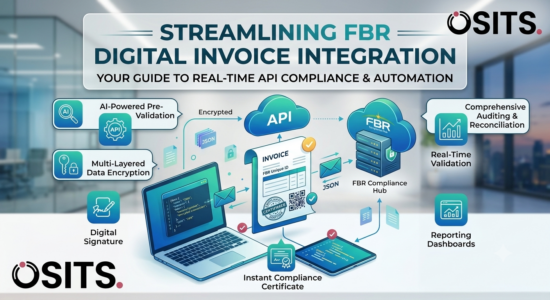
## How the FBR Digital Invoicing System Works — Step by Step
Here is the complete end-to-end process of how the FBR digital invoicing system operates for every transaction:
### Step 1 — Invoice Generated
Your ERP, accounting software, or POS system generates a sales tax invoice as usual, including all tax fields, HS codes, and buyer/seller details.
### Step 2 — Real-Time API Transmission
The invoice data is automatically sent to FBR’s digital invoicing API via an encrypted, secure channel. This happens in real time — no manual submission, no batch filing.
### Step 3 — FBR Validation
FBR’s system validates the invoice against:
– Registered NTN and STRN data
– Applicable tax rates
– Required invoice format and mandatory fields
– HS code accuracy (for goods)
Any errors are returned immediately with specific error codes so your system can correct and resubmit.
### Step 4 — FBR Response Received
Upon successful validation, FBR returns:
– Unique **FBR Transaction Number**
– **Transaction Code**
– Official **QR Code**
– **FBR Logo** for the invoice
### Step 5 — Compliant Invoice Issued
Your system automatically updates the invoice with all FBR-assigned fields. The final compliant invoice — complete with QR code and FBR transaction number — is ready to send to your customer, print, or email.
The entire process from Step 2 to Step 5 typically takes **2–5 seconds** in a properly integrated system.
—
## How to Register for the FBR Digital Invoicing System — IRIS Portal
Before your business can connect to the FBR digital invoicing system, you must register on the **FBR IRIS portal**. Here is the step-by-step registration process:
**Step 1 — Access the IRIS Portal**
Go to the official FBR IRIS portal at iris.fbr.gov.pk and log in using your NTN credentials.
**Step 2 — Navigate to e-Invoicing Section**
Once logged in, go to the e-Invoicing or Digital Invoicing section of the IRIS portal. The menu location may vary based on IRIS updates.
**Step 3 — Register Your Software/ERP**
Register your invoicing software, ERP system, or POS system within the IRIS portal. You will need to provide basic details about your software.
**Step 4 — Choose a Licensed Integrator**
FBR requires you to connect through a Licensed Integrator (LI). Your options include:
– **PRAL (Pakistan Revenue Automation Limited)** — Government-backed, free of cost ✅ Recommended
– Third-party licensed integrators — Fee-based, may offer additional features
**Step 5 — Generate API Credentials**
After registration, IRIS will generate your API credentials including client ID, client secret, and endpoint URLs. Keep these secure.
**Step 6 — Sandbox Testing**
Before going live, you must complete FBR’s mandatory sandbox (testing) environment validation. This involves submitting test invoices across all required scenarios — FBR has 28 mandatory test scenarios that must pass before production access is granted.
**Step 7 — Production Go-Live**
Once sandbox testing is approved, switch to the production environment. All real invoices must now be submitted through the FBR digital invoicing system in real time.
IRIS portal registration is typically approved within **1–3 business days**.
—
## Common Errors in the FBR Digital Invoicing System and How to Fix Them
Businesses new to the FBR digital invoicing system frequently encounter these errors:
**Error: Invalid NTN/STRN**
Cause: Buyer NTN not registered or incorrectly entered.
Fix: Verify buyer NTN on the FBR IRIS portal before invoice submission.
**Error: Invalid HS Code**
Cause: Wrong or missing Harmonized System code for goods.
Fix: Use the correct 8-digit HS code from the Pakistan Customs Tariff.
**Error: Tax Rate Mismatch**
Cause: GST rate applied does not match FBR’s registered rate for that HS code.
Fix: Cross-check applicable GST rates in the Sales Tax Act schedules.
**Error: Duplicate Invoice Number**
Cause: Same invoice reference number submitted twice.
Fix: Ensure your system generates unique, sequential invoice reference numbers.
**Error: API Timeout**
Cause: Network connectivity issue or FBR server delay.
Fix: Implement retry logic with exponential backoff in your integration.
—
## Penalties for Non-Compliance with the FBR Digital Invoicing System
Failure to comply with the FBR digital invoicing system carries serious financial and operational consequences under the Sales Tax Act 1990:
**Section 33 penalties apply:**
– Per-invoice penalties for non-compliant invoices
– Penalties scale with the value of the invoice
– Input tax claims can be rejected for invoices not processed through the system
– FBR audit triggers for businesses with inconsistent reporting
– In serious cases, STRN suspension and business disruption
The longer your business operates without FBR digital invoicing system integration, the greater the cumulative penalty exposure becomes. If you are not yet compliant, contact OSITS immediately for emergency integration.
—
## FBR Digital Invoicing System Integration with ERP — Your Options
The most common question Pakistani businesses ask is: **”Do I need to replace my entire ERP to connect to the FBR digital invoicing system?”**
The answer is **no** — but you do need a properly built integration layer between your existing system and the FBR API.
There are three main integration approaches:
**Option 1 — Native ERP Integration (Best)**
Your ERP software is directly connected to the FBR digital invoicing system API. Every invoice generated in your ERP is automatically submitted to FBR without any manual steps. OSITS builds this type of integration for all ERP platforms.
**Option 2 — Middleware Integration**
A middleware layer sits between your existing ERP and the FBR API. Your ERP generates invoices as normal, the middleware handles FBR submission, validation, and response, then updates your ERP with the FBR transaction number and QR code. Ideal for legacy systems that cannot be modified directly.
**Option 3 — Standalone Web Portal**
A separate web-based portal where you manually upload invoices in PDF or Excel format for FBR submission. Suitable for very low invoice volumes but not scalable for businesses issuing more than 20–30 invoices per day.
For most Pakistani businesses, **Option 1 or 2** is the right approach — and OSITS has implemented both for clients across banking, retail, manufacturing, and services.
—
## Why Choose OSITS for FBR Digital Invoicing System Integration
OSITS has been building ERP and compliance software for Pakistani businesses since 2003 — over 20 years before FBR digital invoicing became mandatory.
**Our FBR digital invoicing system integration includes:**
**✅ Full FBR API Integration**
Direct connection to FBR’s PRAL API — real-time invoice submission, validation, and response handling built into your existing ERP or accounting system.
**✅ All 28 FBR Test Scenarios Pre-Validated**
Our integration solution has already passed all mandatory FBR sandbox testing scenarios, meaning your go-live is faster and risk-free.
**✅ Bulk & Batch Processing**
For high-volume businesses, our system supports bulk invoice submission with automatic HS code-based tax calculation, grouping by invoice number, and one-click FBR submission.
**✅ Complete Audit Trail**
Every FBR request, response, transaction number, QR code, and error log is stored and accessible for any tax audit.
**✅ SRB Integration**
For Sindh-based businesses, we also provide Sindh Revenue Board (SRB) integration alongside FBR digital invoicing system compliance.
**✅ Automatic Compliance Updates**
As FBR updates its API, introduces new SROs, or changes invoice format requirements, your integration is updated automatically at no additional cost.
**✅ Local Support — Karachi & Islamabad**
Our support team is based in Pakistan. No time zone issues, no language barriers, no offshore delays.
**Trusted by:**
Meezan Bank · Faysal Bank · KFC Pakistan · Gul Ahmed · Nishat Group · Sapphire · 300+ businesses across Pakistan
—
## FBR Digital Invoicing System vs FBR POS System — What’s the Difference?
Many businesses confuse the FBR digital invoicing system with the FBR POS integration system. Here’s the clear difference:
| Feature | FBR Digital Invoicing System | FBR POS System |
|———|——————————|—————-|
| Target | B2B manufacturers, importers, service providers | Retailers, restaurants, shops |
| SRO | SRO 709(I)/2025 | SRO 297(I)/2018 and amendments |
| Invoice type | Sales tax invoices | POS receipts |
| Integration | ERP/accounting system API | Physical POS terminal |
| Applicable to | Corporate taxpayers | Tier-1 retailers |
If your business issues formal sales tax invoices to other registered businesses, you need the **FBR digital invoicing system**. If you are a retailer issuing receipts to end consumers, you need **FBR POS integration**. Some businesses — such as large retailers who also sell to registered businesses — need both.
OSITS provides integration for both systems.
—
## Frequently Asked Questions — FBR Digital Invoicing System
**Q: Is the FBR digital invoicing system mandatory for all businesses?**
It is mandatory for all corporate taxpayers, registered manufacturers, importers, large wholesalers, and sales tax registered service providers under SRO 709(I)/2025. Check with FBR or contact OSITS to confirm your specific obligation.
**Q: Can I use Excel to submit invoices to the FBR digital invoicing system?**
You can upload Excel files through compatible software that then handles API transmission to FBR. Direct Excel submission to FBR is not supported — the invoices must pass through an FBR-connected system.
**Q: How long does FBR digital invoicing system integration take?**
With OSITS, straightforward integrations are completed in 5–15 business days. Complex, multi-branch, or heavily customised ERP integrations may take 3–6 weeks.
**Q: What happens if FBR rejects my invoice?**
A rejected invoice is not legally considered issued for tax purposes. FBR returns specific error codes. Our system catches common errors before submission to minimise rejections.
**Q: Does the FBR digital invoicing system work for service businesses?**
Yes. Service businesses registered for sales tax must also comply with the FBR digital invoicing system under SRO 709.
**Q: Is PRAL free to use as a licensed integrator?**
Yes. PRAL (Pakistan Revenue Automation Limited) is the government-backed licensed integrator and is free of cost for businesses to use as their integration gateway.
**Q: Can OSITS integrate the FBR digital invoicing system with my existing ERP?**
Yes — OSITS integrates the FBR digital invoicing system with all major ERP platforms, custom-built accounting systems, and legacy software without requiring you to replace your existing system.
—
## Get Your FBR Digital Invoicing System Integrated — Free Consultation
If your business is not yet connected to the FBR digital invoicing system, every day of delay increases your penalty exposure and audit risk.
OSITS has completed FBR digital invoicing system integrations for businesses across banking, retail, manufacturing, and services in Pakistan. Our team handles the entire process — IRIS registration, API integration, sandbox testing, production go-live, and ongoing compliance updates.
**Book a free 30-minute consultation:**
📍 Offices in Karachi & Islamabad
📞 0333-2290266
🌐 https://www.osits.pk/contact-us/
Get compliant before FBR comes to you.
—
*Published by OSITS — Pakistan’s trusted software house since 2003. 300+ clients across banking, retail, manufacturing, government, and services. Specialists in ERP, payroll, and FBR compliance software.*
Related posts

OSITS • August 13, 2026
FMCG ERP System in Pakistan: The Complete 2026 Guide for Distributors and Manufacturers

OSITS • August 13, 2026


